Deploy
Domains
Every unit has an address on kiprsh.app. Add your own domain, create the DNS records Kuiper shows you, and HTTPS follows on its own.
On this page
Addresses#
Every unit has its own address under the apps domain, such as concierge-ops-lab.kiprsh.app. It works as soon as the unit is deployed, with HTTPS, and needs no setup.
You can also serve a unit from your own domain, such as example.com or agents.example.com. Kuiper gets a Let's Encrypt certificate for it the first time it is visited after DNS points at Kuiper.
Add a domain#
In the dashboard, open Domains, type the domain, pick the unit and press Add.
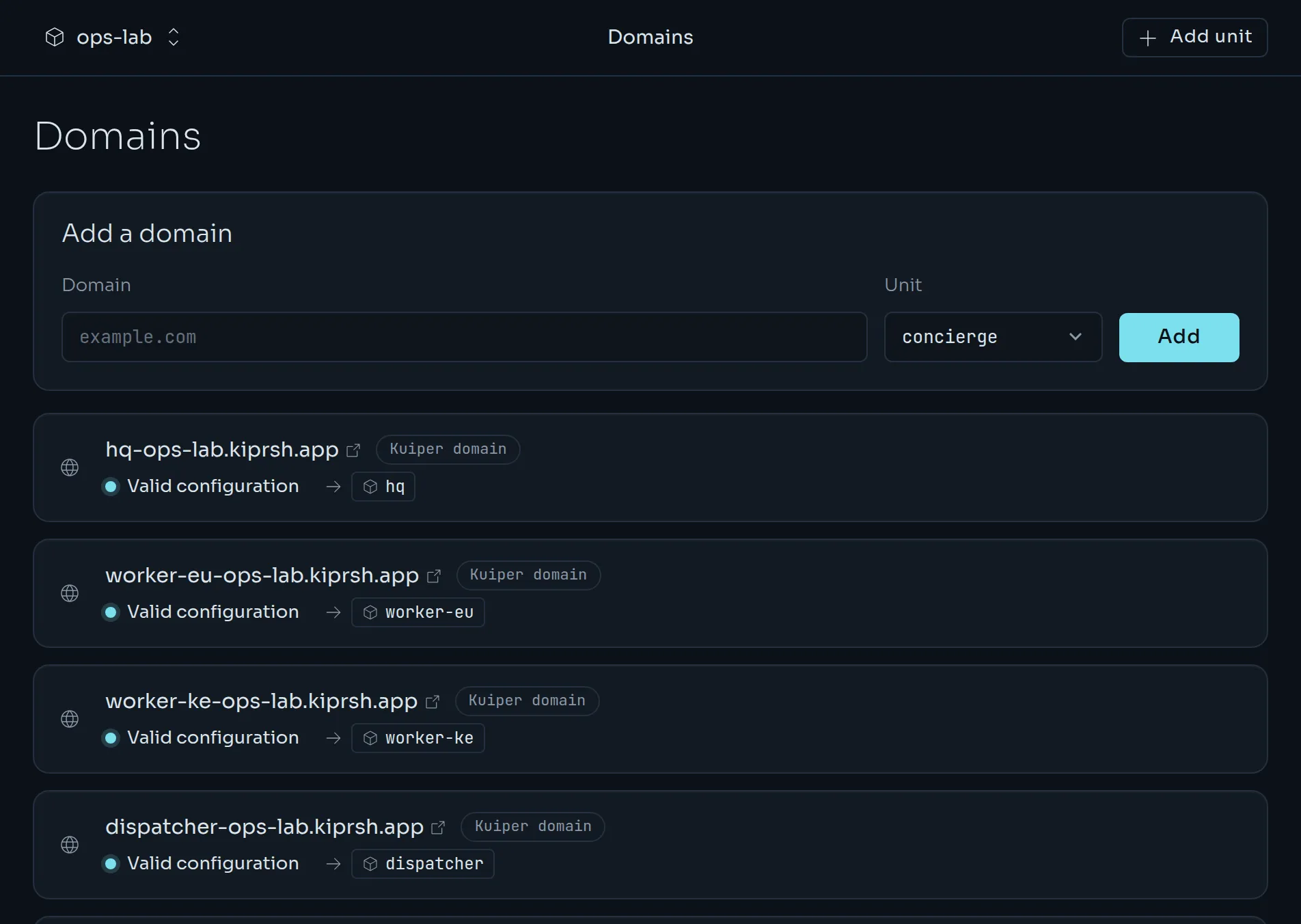
From the CLI:
kuiper domains add example.com -u web --www
kuiper domains add agents.example.com -u api
kuiper domains ls
--www adds www.example.com too, and redirects it to example.com. Kuiper then shows the DNS records to create, and checks them for you.
DNS records#
Create the records at your DNS provider, the place where the domain's nameservers are. Kuiper shows names relative to the domain, the way most providers expect them. @ is the domain itself.
A subdomain, such as agents.example.com, needs a CNAME record.
| Type | Name | Value |
|---|---|---|
| CNAME | agents | cname.kiprsh.app |
An apex domain, such as example.com, needs an A record, because an apex cannot have a CNAME.
| Type | Name | Value |
|---|---|---|
| A | @ | The edge address Kuiper shows you. |
If your provider offers ALIAS, ANAME or CNAME flattening at the apex, you can point that at cname.kiprsh.app instead.
Remove any other A or AAAA records on the same name. If some requests go somewhere else, visitors see a mix of your app and the old site, and the certificate cannot be issued. An old AAAA record, the IPv6 kind, is the usual culprit. Many clients prefer IPv6 and never reach Kuiper.
Status and verification#
The status line tells you where a domain stands.
| Status | What it means |
|---|---|
| Valid configuration | DNS points at Kuiper and the domain is live. |
| Pending verification | There are no DNS records yet, or ownership is not proven yet. |
| Invalid configuration | DNS points somewhere else. The message says exactly what to change. |
| Issuing certificate | DNS is right and the certificate is on its way, usually in under a minute. |
| Certificate error | Several attempts to get a certificate failed. See the checklist below. |
Kuiper checks pending domains every minute for the first hour, then less often. Refresh checks right away, and so does the CLI:
kuiper domains verify example.com
kuiper domains verify example.com --wait
kuiper domains inspect example.com
--wait keeps checking until the domain is live. It gives up after 600 seconds, or after --timeout SECONDS. inspect shows the domain's status, what DNS currently says and the records to create.
A domain is only served once Kuiper knows it is yours. Pointing DNS at Kuiper proves it for a domain nobody else on Kuiper uses. You can also prove it with a TXT record, which Kuiper shows under the other records:
| Type | Name | Value |
|---|---|---|
| TXT | _kuiper-challenge.agents | kuiper-verify=… |
The value is specific to your domain and project. Use it to verify a domain before you move its traffic. Set the TXT record first, and switch the CNAME when you are ready.
A domain another project uses#
If a project already holds the domain, adding it fails and shows the TXT record that would prove you own it. Add that record, then use Verify and move it here, or run:
kuiper domains claim example.com -u webThe domain moves to your project and the other project's activity log notes the move. Pointing DNS at Kuiper is not enough to take a domain from another project. Only the TXT record is.
Redirects#
A domain can redirect instead of serving a unit. Adding example.com with --www makes www.example.com answer with a permanent redirect (308) to it, keeping the path and query. Add www.example.com instead to make www the main name and redirect the apex to it.
To turn any domain into a redirect, or back into a server:
kuiper domains set old.example.com --redirect-to example.com
kuiper domains set old.example.com --redirect-to none
kuiper domains set example.com -u api
The target must be another domain of the project, or one of its units' own addresses. In the dashboard, choose Edit and pick Redirect to.
Remove a domain#
kuiper domains rm example.comKuiper stops routing the domain right away. Its DNS records stay as they are, so remove them at your provider if you no longer need them.
When something is wrong#
- Still Invalid configuration after changing DNS. Records take a few minutes to hours to reach everyone, depending on the old record's TTL. The status shows what Kuiper currently sees, under Currently resolves to. Press Refresh when the change has spread.
- It says the domain points to another host. Change the record to the value Kuiper shows.
- It says the domain is a CNAME to something else. Change the CNAME to
cname.kiprsh.app. - Certificate error. Check three things: CAA records, that the record is not proxied, and that nothing else answers for the name. Let's Encrypt allows only a few failed attempts per hostname per hour, so after you fix the cause, wait a little and press Refresh.
Cloudflare#
If your DNS is on Cloudflare, set the record to DNS only, the grey cloud. With the proxy on, the orange cloud, visitors reach Cloudflare and not Kuiper. Kuiper cannot get the certificate and reports that the domain resolves to Cloudflare proxy addresses.
CAA records#
If the domain has CAA records, one of them must allow Let's Encrypt. No CAA record at all also works.
| Type | Name | Value |
|---|---|---|
| CAA | @ | 0 issue "letsencrypt.org" |