Agents
Station units
Deploy a Station daemon with no Dockerfile, sign in to its dashboard, inspect signals, runs and beacons from Kuiper, and mint API keys for other services.
On this page
Deploy a Station daemon#
A Station 3 project, with a station.config.ts and the station-daemon package, deploys without a Dockerfile or a kuiper.json. Create it as a station unit, so Kuiper treats it as Station before anything is built:
kuiper units create hq --kind station
kuiper deploy --source . -u hq --wait
Or deploy from a repository:
kuiper link -u hq --repo https://github.com/you/station-app --branch main
kuiper build -u hq
The dashboard's Add unit form offers the same choice of type. It picks Station for you when it finds a daemon in the repository you import. A plain agent unit whose build detects a Station daemon becomes a station unit on that build, and the project's Activity says so.
A station unit gets a dashboard login the moment it is created. Kuiper sets STATION_AUTH_USERNAME to admin and STATION_AUTH_PASSWORD to a generated project secret named DASHBOARD_PASSWORD_<UNIT>. Kuiper uses that login to mint its own read key, so the Inspect card works from the first deploy.
What the builder does#
The builder detects Station from a station.config.ts, .mts, .js or .mjs file, or from a station-daemon dependency. To see what it would use, or to change it, write the manifest out:
kuiper manifest init            # detects Station from the directory
kuiper manifest init --station  # an empty directory, or an image deploy
That writes the kuiper.json the builder would infer. Commit it and the builder uses it as it is. What the builder produces:
- Image. Node 22, your package manager and build tools for native modules. It adds the Docker CLI when you depend on
station-sandbox,station-browser-useorstation-images. - Start command.
stationd --host 0.0.0.0 --port 4400 --dir /data/.station, run undertini.--dirkeeps Station's keys, logs and environment store on the unit's volume. - Manifest. A public port
httpon 4400, a health check onGET /api/v1/health, a 10 GiB volume at/data, and the names in.env.exampleas optional variables.
Keep state on the volume#
Station's default adapters keep data in memory. Use the SQLite adapter on the volume so state survives a restart:
import { defineConfig } from "station-daemon";
import { SqliteAdapter } from "station-adapter-sqlite";

export default defineConfig({
  adapter: new SqliteAdapter({ dbPath: "/data/station.db" }),
});
A SQLite-backed Station is one replica. For several workers, use the Postgres adapters with a managed database, and give each worker its own unit.
Inspect the daemon#
A Station unit's page has an Inspect card. It shows the daemon's identity and has tabs for signals, runs, broadcasts, beacons, schedules, live events and API keys. Everything is read from the daemon's own API, through the node it runs on.
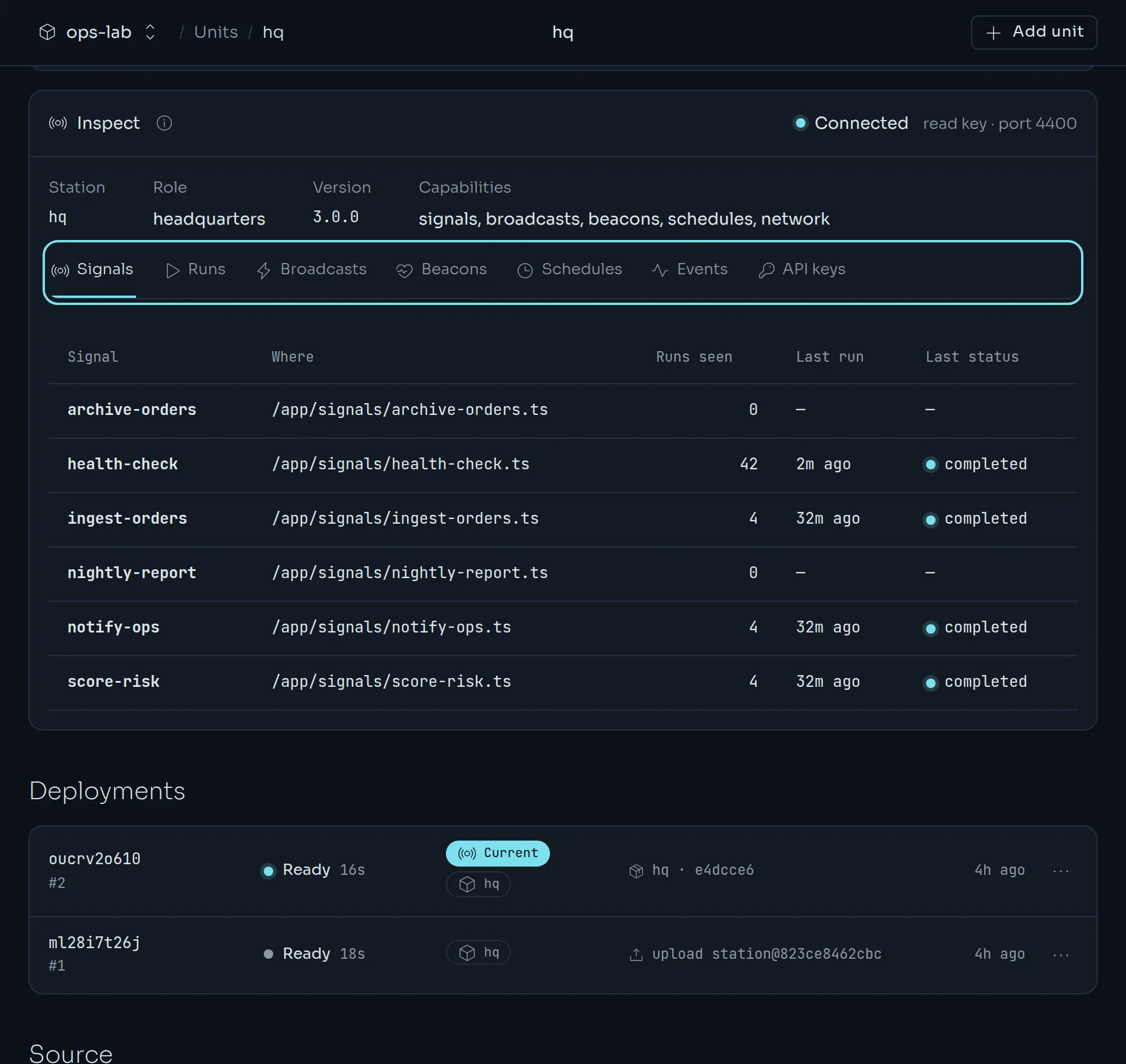
Kuiper needs a credential the daemon accepts. It signs in once with the unit's dashboard login, mints a read and cancel API key named kuiper-inspector, and keeps that key sealed. If the daemon forgets the key, for example after a fresh data directory, Kuiper notices and mints a new one. A daemon that runs without authentication is read directly.
Runs and details#
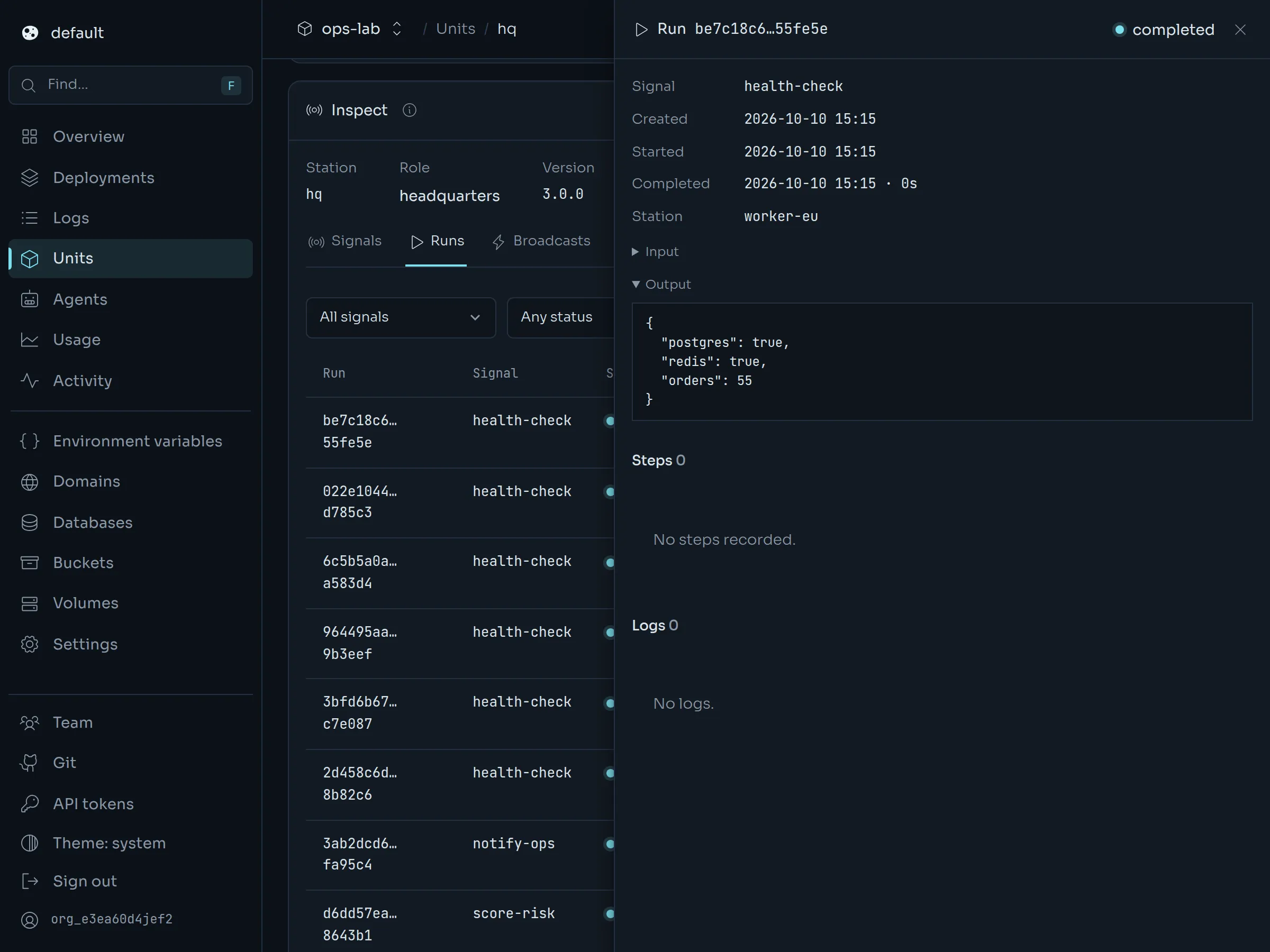
Open the Runs tab, filter by signal or status, and click a run. Its details open in a drawer on the right: the signal, timing, station, input, output, steps and logs. The list stays where it was. Close the drawer with the X or with Esc. Admins can cancel a pending or running run from here.
Live events#
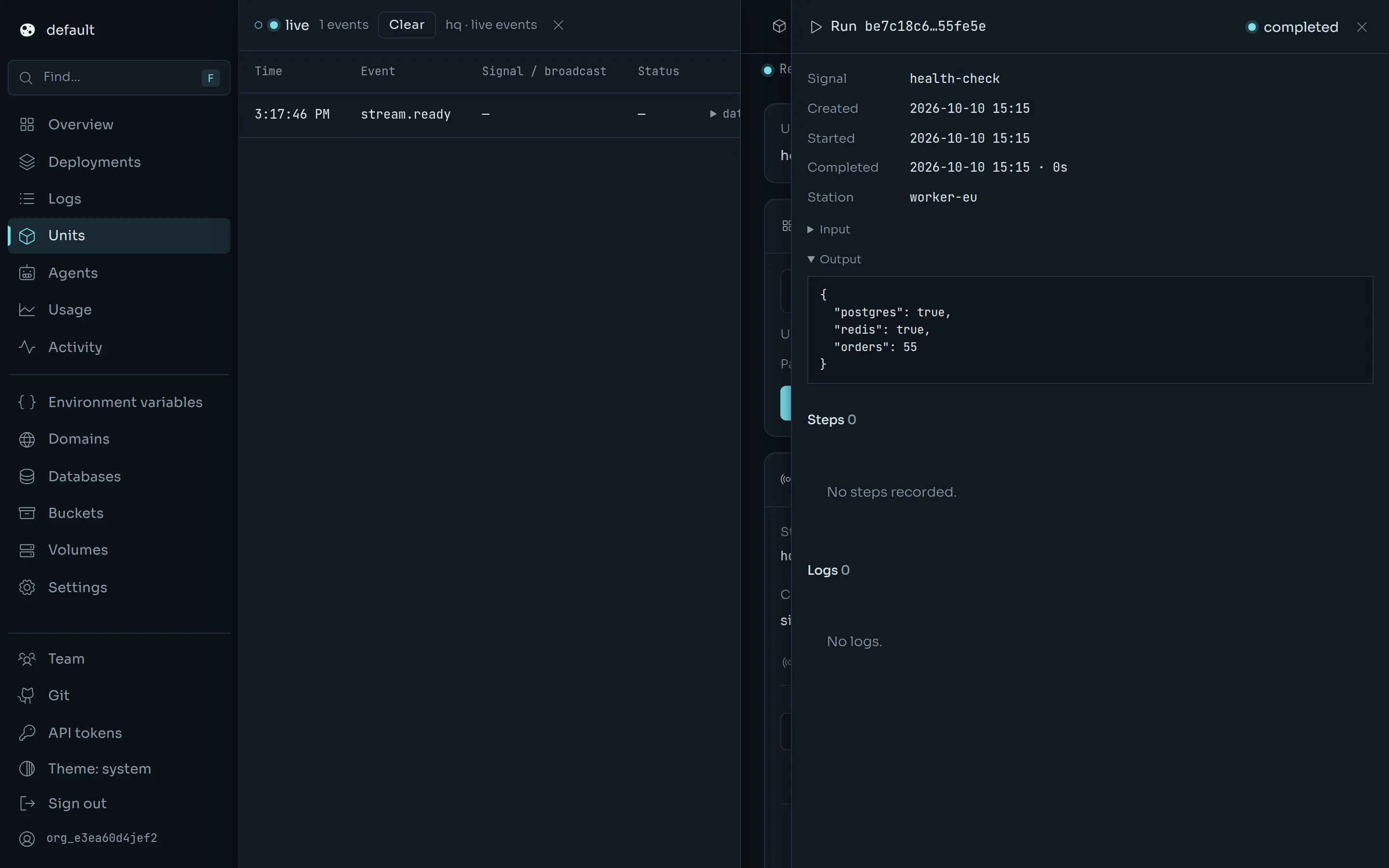
The Events tab streams events as they happen. Press Pin to side and the stream moves to a drawer on the left, where it keeps running while you open other tabs, runs and beacons on the right.
Across the project#
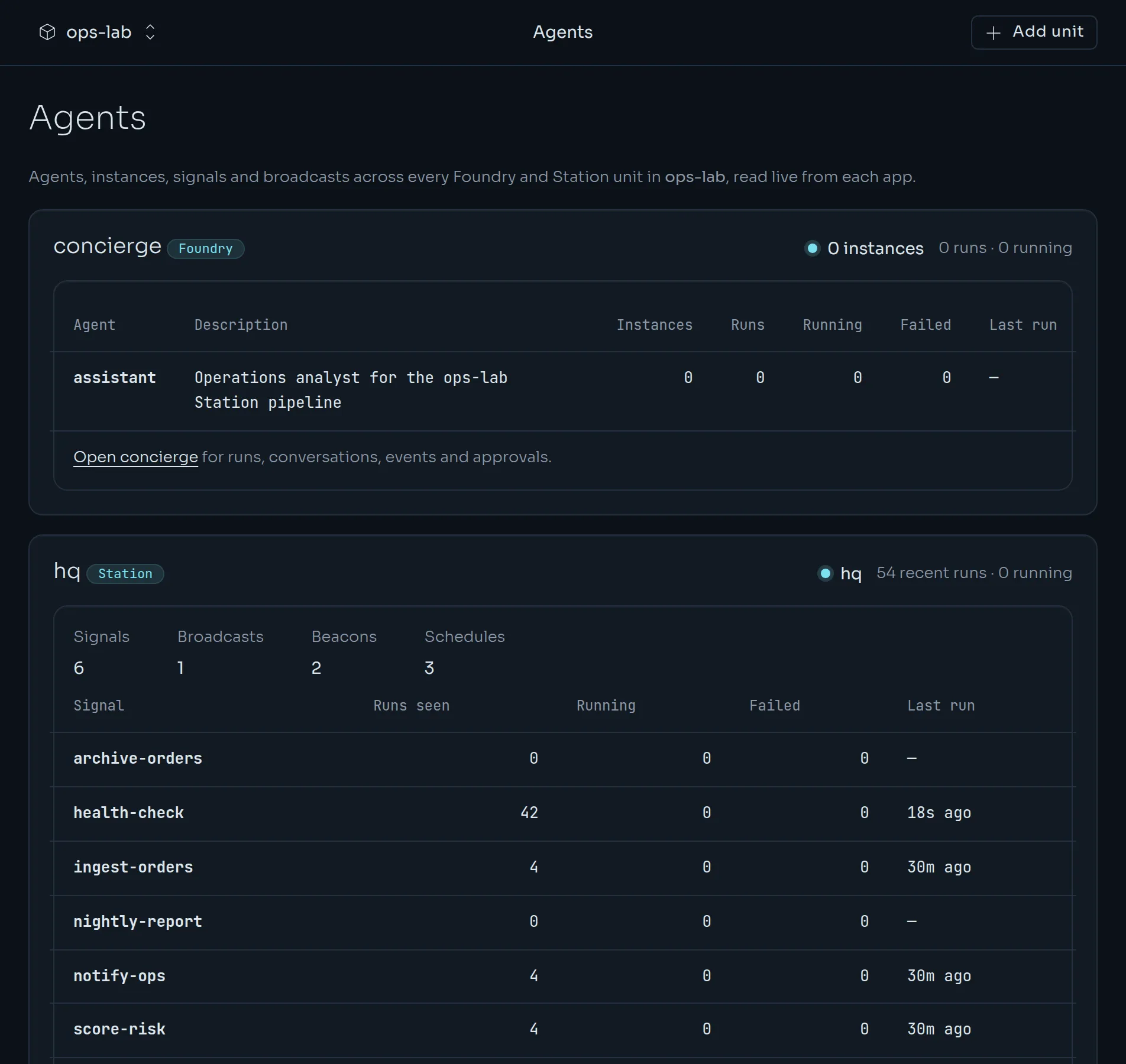
The project's Agents page lists every Station daemon with its signal, broadcast, beacon and schedule counts, and the health of recent runs. The Usage page adds an Agent activity section for the same period as resource usage.
For scripts, the same reads are available from the API at GET /v1/projects/{project}/units/{unit}/station/<station path>, for example …/station/runs?status=failed&limit=20.
API keys for other services#
Anything that triggers signals or broadcasts from outside, such as another unit, a cron job or a webhook receiver, calls Station's api/v1 with an API key. Kuiper mints and keeps those keys, so nobody has to sign in to the daemon's dashboard and paste a key into a secret by hand.
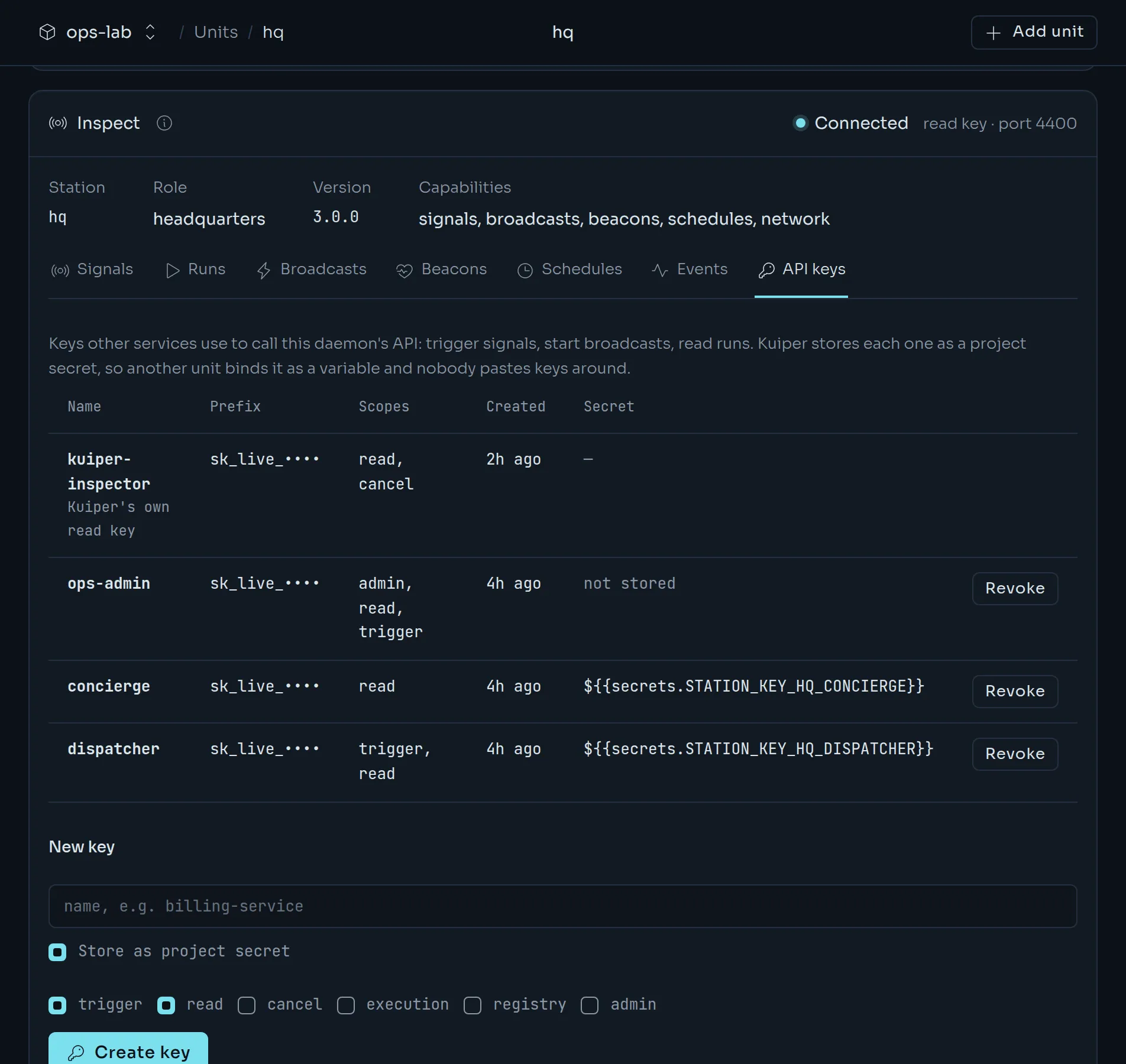
Open the API keys tab on the Inspect card. It lists the daemon's keys with their name, prefix, scopes and age, and the project secret each one is kept in. Admins can mint a new key there. Pick a name and the scopes the service needs.
| Scope | Lets the holder |
|---|---|
trigger | Trigger signals and start broadcasts. |
read | Read runs, signals, broadcasts, beacons, schedules and events. |
cancel | Cancel runs. |
execution | Call the worker and execution routes. |
registry | Call the registry routes. |
admin | Do everything, including manage keys. |
The default is trigger and read. The key is shown once. Unless you untick Store as project secret, Kuiper stores it as the project secret STATION_KEY_<UNIT>_<NAME>. A unit that needs it binds that secret like any other:
kuiper env set -u billing 'STATION_KEY=${{secrets.STATION_KEY_HQ_BILLING}}'The unit then calls https://<station host>/api/v1/signals/<name>/trigger with the header Authorization: Bearer $STATION_KEY.
The CLI does the same:
kuiper station keys -u hq
kuiper station create-key billing --scope trigger,read -u hq
kuiper station create-key ops --scope admin --no-secret -u hq
kuiper station revoke-key key_01… -u hqcreate-keyprints the key once.--scopetakes a comma-separated list or can be repeated.--no-secretprints the key and keeps no copy in Kuiper.- Minting a key with a name that already exists rotates its secret in place. Units that reference it are marked pending restart.
revoke-keyremoves the key from the daemon and drops its secret, unless a variable still references it. In that case the secret stays and the answer lists the references.- The
kuiper-inspectorkey is Kuiper's own read key. You cannot mint or revoke it.
The Station dashboard#
The daemon has no web interface of its own. station-dashboard is a separate process that talks to one daemon, and Kuiper runs it for you as a companion unit.
Open the unit and choose Station dashboard, then Turn on. Or from the CLI:
kuiper dashboard -u hq --enableKuiper creates a companion unit named <unit>-dashboard with its own address, built from station-dashboard@3. It points the companion at the daemon's public URL, and sets the daemon's login if none exists yet. The first build of the companion takes a minute or two. Open the companion's address and sign in with the daemon's username and password.
| Command | What it does |
|---|---|
kuiper dashboard -u hq | Show the dashboard's state, address and login. |
kuiper dashboard -u hq --enable | Turn it on. Generates a login if none is set. |
kuiper dashboard -u hq --username ops --password - | Set a login. - reads the password from standard input and generate makes a new one. |
kuiper dashboard -u hq --disable | Turn it off. This deletes the companion unit. The daemon keeps its login. |
Deleting the daemon deletes its companion as well.
Reach Station from other units#
Units in the same project reach each other on the private network at http://<unit>.<project>.internal:4400. Set the endpoint so the daemon advertises its internal address:
kuiper env set -u worker 'STATION_ENDPOINT=${{worker.INTERNAL_URL}}'Keep STATION_EXECUTION_TOKEN and the admin password in project secrets.
kuiper secrets set STATION_EXECUTION_TOKEN=- STATION_PASSWORD=-
kuiper env set -u worker \
  'STATION_EXECUTION_TOKEN=${{secrets.STATION_EXECUTION_TOKEN}}' \
  STATION_AUTH_USERNAME=admin \
'STATION_AUTH_PASSWORD=${{secrets.STATION_PASSWORD}}'Logs#
kuiper logs -u hq -fstreams the daemon's output, kept across crashes and redeploys, with secret values redacted. Signal and job run logs live in Station's own log store under /data/.station, and in its dashboard.