Operate
Logs, deployments and rollbacks
Read what a unit printed, follow a deploy, restart a unit, go back to an earlier deployment and move a unit to another region.
On this page
Logs#
Kuiper keeps what each unit prints to stdout and stderr. The logs survive crashes, redeploys and restarts, and secret values are redacted as the lines are written.
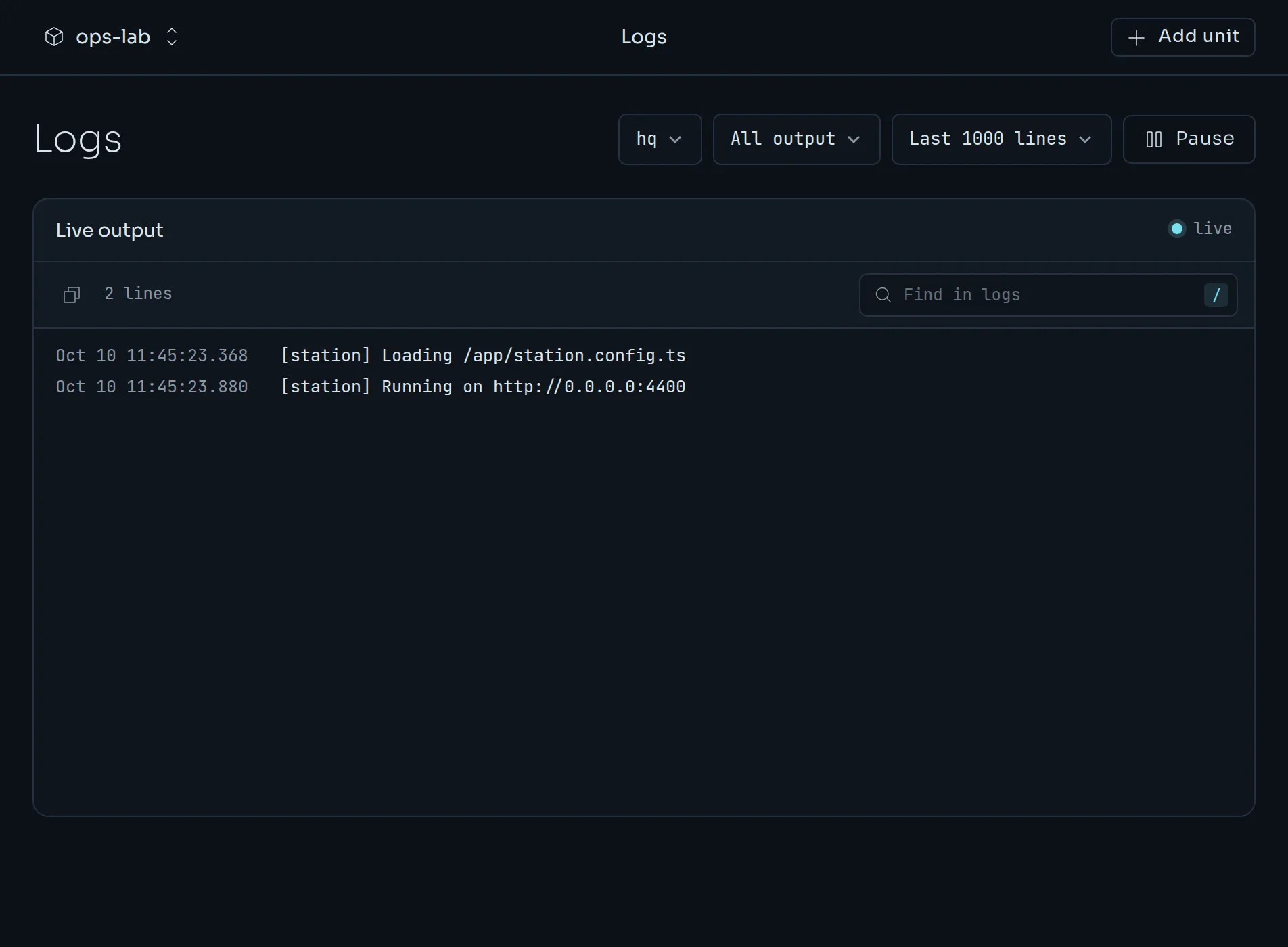
In the dashboard, open Logs, pick a unit, and the output follows live. Choose all output, stdout only or stderr only, and the last 200, 500, 1000 or 5000 lines. Press Pause to read without it moving, and / to search.
From the CLI:
kuiper logs -u web
kuiper logs -u web -f
kuiper logs -u web --tail 1000
kuiper logs -u web --deployment dep_…- With no flags,
kuiper logsprints the last 200 lines. -ffollows. When a new deployment takes over, the CLI prints a--- deployment … ---line and switches to its log.--tail Nsets how many lines to start with.--deployment IDreads an earlier deployment. Find the ID withkuiper deployments.
Each unit keeps the logs of its newest five deployments. A unit that moved to another node leaves its old logs behind on the old node until they are pruned.
Deployments#
A deployment is one image running as a unit. Each deploy, from a push, a folder, an image, a restart or a rollback, creates a new one with the next number. One deployment per unit is live.
kuiper status -u web
kuiper deployments -u web
kuiper deployment dep_…
kuiper builds -u web
kuiper statusshows the unit's state, its address, the live deployment, any pending restart, and where it is placed.kuiper deploymentslists them, with number, ID, status, image, source and age.kuiper deployment IDshows one, with its error if it failed and the environment it received, with secrets masked.kuiper buildslists the builds of a unit, with status, ref, commit and any error.
The same information is in the dashboard on Deployments, with a Current badge on the live one. See the dashboard tour.
Follow a deploy#
Add --wait to kuiper deploy, and the CLI streams the build log and prints each step of the rollout until it ends. It ends in one of three ways:
live ✓, and the command succeeds.- A failure, with the error. For example, a build that did not finish, or a variable that points at something that does not exist. A deploy never substitutes an empty string for a missing value.
superseded, when a newer deployment replaced this one before it went live.
What happens during a deploy#
Kuiper starts the new deployment and checks its health. For a unit without a volume, the old deployment keeps serving until the new one is healthy, then traffic switches and the old one drains. A unit with a volume, which is every Foundry and Station unit, cannot run twice at once. Kuiper stops the old instance first, so the unit is briefly absent.
If the app crashes, Kuiper restarts it with a backoff that grows from one to sixty seconds. Its output up to the crash stays in the logs.
Restart#
Variables and secrets apply when a unit restarts. A unit with a change waiting is marked pending restart.
kuiper restart -u webThis creates a new deployment from the live one's image and manifest, with the current variables and secrets. It restarts at a turn boundary. In the dashboard, the units table shows a restart needed tag, and the unit's card and page show an "Environment changed" notice with a Restart now button. Turn on Auto-restart in the project's Settings if you would rather Kuiper did it. See Variables and secrets.
Rollbacks#
If a deployment misbehaves, go back to an earlier one.
kuiper deployments -u web
kuiper rollback dep_…
A rollback creates a new deployment. It runs the earlier deployment's image and manifest, with the variables and secrets as they are now. Nothing is rebuilt, so it is fast.
In the dashboard:
- Roll back on a unit's card on the overview goes to the previous successful deployment.
- Roll back to this on a deployment's page, or in the menu of its row, goes to that one.
- Redeploy runs a deployment again with the current variables.
Regions and moving units#
Nodes have a region, a short name such as eu-fsn or us-east. Where a unit runs is decided in this order: its own placement, the repository's kuiper.json, and the project's default region in Settings. Nothing set means anywhere.
kuiper regions
kuiper move -u web --region us-east
kuiper migrations -u web
kuiper regions lists regions with their nodes and capacity. kuiper move moves a unit to a region, or to an exact node with --node. A unit without a volume starts in the new place while the old one keeps serving, then the address switches over. A unit with a volume moves too: its data is copied while it keeps running, then it stops, sends the last changes and starts in the new region. kuiper migrations lists these moves with their phase and progress. In the dashboard, use Move on the unit page.
A unit in a region also answers on <unit>.<region>.<apps domain>. Changing the project's default region moves nothing. It applies to the next placement of each unit.
Usage and events#
kuiper usage
kuiper events
kuiper usage prints reserved and used CPU and memory for the last 30 days. kuiper events prints the project's activity feed. Both are on the dashboard as Usage and Activity.