Deploy
Variables and secrets
Give a unit its settings. Values are templates that can point at a secret, a database or another unit, and a restart applies them.
On this page
How variables work#
A variable is a setting your code reads from its environment, like DATABASE_URL or LOG_LEVEL. You choose every name. Kuiper never injects fixed names that your app has to adopt. If your code reads PG_CONN, you set PG_CONN.
The value of a variable is a template. It can be plain text, or it can point at something else in the project. Kuiper fills in the pointers when it deploys the unit.
| Template | Where the value comes from |
|---|---|
info | Plain text, such as the value in LOG_LEVEL=info. |
${{secrets.ANTHROPIC_API_KEY}} | A project secret. |
${{shared.LOG_LEVEL}} | A shared project variable. |
${{main.DATABASE_URL}} | An output of a managed database called main. |
${{worker.INTERNAL_URL}} | An output of another unit called worker. |
${{neon.DATABASE_URL}} | An output of an external resource called neon. |
postgres://${{db.PGUSER}}:${{db.PGPASSWORD}}@${{db.PGHOST}}:5432/app | Text and pointers mixed, to build your own string. |
The pattern is always ${{<name>.<OUTPUT>}}. The name is the slug of a unit, a database, a bucket or an external resource, or one of the words secrets and shared. The output is the value it exports. Shell-style ${VAR} passes through untouched. To write a literal ${{, double the dollar sign: $${{.
Templates keep your config stable. When a database moves or a secret rotates, the pointer stays the same and Kuiper resolves it to the new value.
Set variables#
In the dashboard, open Environment variables, choose a unit, type a name and a value, and press Save. The lock switch next to the value stores it as a secret. Import .env takes a pasted .env file.
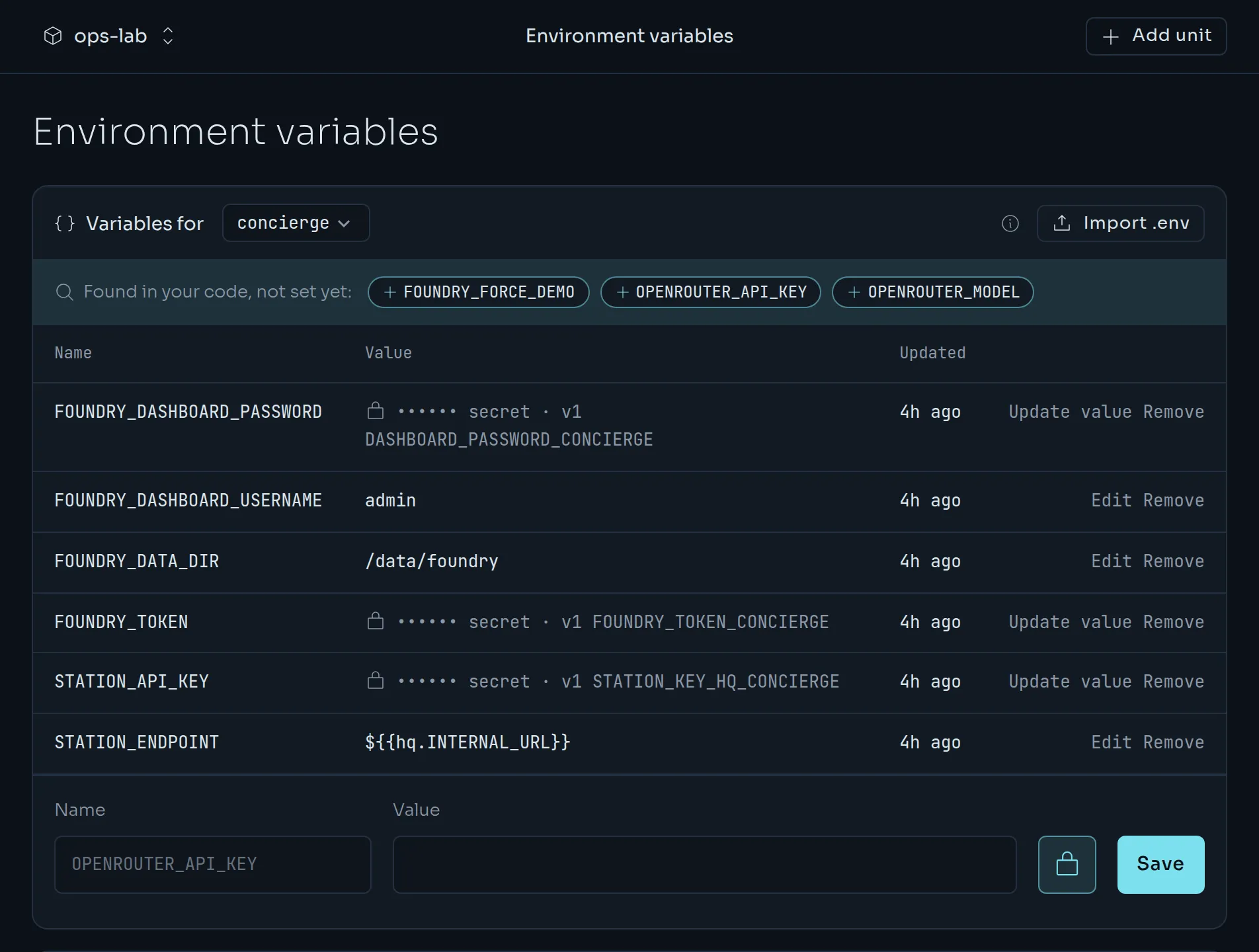
Kuiper also reads your source for the variable names it uses, and lists the ones the unit does not have yet as Found in your code chips. Click a chip to fill in its name. Names that look sensitive, such as …KEY, …TOKEN, …SECRET and …PASSWORD, default to secrets.
From the CLI, kuiper env set takes NAME=TEMPLATE pairs.
kuiper env set -u web LOG_LEVEL=info
kuiper env set -u web 'DATABASE_URL=${{main.DATABASE_URL}}' 'REDIS_URL=${{cache.REDIS_URL}}'
kuiper env list -u web
kuiper env unset -u web LOG_LEVELkuiper env list shows each variable's template and whether it is secret. It never shows a secret's value.
Secrets#
A secret is a value that Kuiper stores sealed. It is write-only: you can replace it or remove it, but nothing ever shows it again. Logs and build output redact secret values.
printf %s "$ANTHROPIC_API_KEY" | kuiper secrets set ANTHROPIC_API_KEY=-
kuiper env set -u web 'ANTHROPIC_API_KEY=${{secrets.ANTHROPIC_API_KEY}}'
NAME=- reads the value from standard input, which keeps it out of your shell history. You can also pass NAME=VALUE, which does not.
kuiper secrets list
kuiper secrets rm ANTHROPIC_API_KEY
kuiper secrets list shows each secret's version, when it was updated and which variables reference it. A variable whose template contains a secret is itself a secret.
Shared variables#
A shared variable is a plain value that several units use. Set it once for the project and reference it from each unit.
kuiper shared set LOG_LEVEL=info
kuiper env set -u web 'LOG_LEVEL=${{shared.LOG_LEVEL}}'
kuiper env set -u worker 'LOG_LEVEL=${{shared.LOG_LEVEL}}'
kuiper shared has the same list, set and rm as kuiper secrets, and the dashboard shows them under Advanced on the variables page.
Reference another unit#
Every unit exports a few values on its own.
| Output | What it is |
|---|---|
INTERNAL_HOST | The unit's private hostname, <unit>.<project>.internal. |
INTERNAL_URL | The private URL, for example http://worker.my-agent.internal:4400. |
PORT_<NAME> | The number of each named port, for example PORT_HTTP. |
PUBLIC_URL | The public address, only for units with a public port. |
Units in the same project reach each other on the private network. Point one at another with a template.
kuiper env set -u web 'WORKER_ENDPOINT=${{worker.INTERNAL_URL}}/jobs'
kuiper outputs -u worker
kuiper outputs lists a unit's outputs and the reference that selects each one.
External services#
Anything that lives outside Kuiper, such as a Neon database, an Upstash Redis or your own RDS, can be a resource too. Add it with its named outputs, and mark the secret ones.
kuiper resources add neon DATABASE_URL=postgres://user:pass@host/db --secret DATABASE_URL
kuiper env set -u web 'PG_CONN=${{neon.DATABASE_URL}}'
kuiper resources list
Your app's variables do not change if you later swap the external service for a managed one. See Databases, Redis and buckets.
Apply changes#
A running unit does not see a change until it restarts. After you set a variable or a secret, the unit is marked pending restart. The units table shows a restart needed tag, and the unit's page offers a Restart now button.
kuiper restart -u webkuiper restart applies the pending changes. It restarts the unit at a turn boundary. Setting a secret marks every unit that references it as pending restart, and kuiper secrets set tells you how many.
If you would rather not do it by hand, turn on Auto-restart in the project's Settings. Kuiper then restarts affected units for you.
To see exactly what a deployment received, open it in the dashboard, or run:
kuiper deployment dep_…It prints the resolved environment of that deployment, with secrets masked.
Variables for the build#
Some builds need a variable, for example a registry token for a private package. Build variables are separate from runtime variables, and they are never secrets. Set them when you link a repository.
kuiper link -u web --repo https://github.com/acme/web --build-env NPM_CONFIG_REGISTRY=https://registry.example.comRuntime secrets are never available to the build.
Rename and delete#
References point at resources, not at names. If you rename an external resource with kuiper resources rename, every template that mentions it is rewritten. Kuiper refuses to delete a database or a resource that a variable still references, and lists the variables that do.