Agents
Glove Foundry units
Deploy a Foundry app with no Dockerfile, protect it with an authorizer, give browsers a login and read its runs from the dashboard.
On this page
Deploy a Foundry app#
A Glove Foundry app deploys without a Dockerfile or a kuiper.json.
kuiper units create concierge
kuiper link -u concierge --repo https://github.com/you/concierge --branch main
kuiper build -u concierge
Later pushes build and deploy on their own. To ship what is on your disk instead, use kuiper deploy --source . -u concierge --wait.
What the builder does#
The builder detects Foundry from a foundry.config.ts, .mts, .js or .mjs file, or from a glove-foundry dependency. To keep or tune what it infers, write it out with kuiper manifest init --foundry.
- Image. Node 22, your package manager, picked from the lockfile and
packageManager, and build tools for native modules. It runs yourbuildscript if you have one. Foundry itself has no build step. - Start command.
glove foundry start --host 0.0.0.0 --port 4141, run undertini. Foundry reads noPORTorHOSTvariable, so these flags are required. - Manifest. A public port
httpon 4141, a TCP health check, a request of 0.5 vCPU and 768 MiB with a limit of 2 vCPU and 2 GiB, a 5 GiB volume at/data, and the names in.env.exampleas optional variables.
Commit your own kuiper.json to change any of it.
Add an authorizer#
Foundry refuses to bind a public interface unless foundry.application.ts defines requestAuthorization. This is deliberate. Without it, the inspector, the API and the event streams would be open to anyone. Kuiper warns you before the build, on the New project page and in the build log, when it finds none in the source.
This authorizer accepts a bearer token from API clients, FOUNDRY_TOKEN, and a username and password from browsers:
import { timingSafeEqual } from "node:crypto";
import { Effect } from "effect";
import { defineApplication } from "glove-foundry";

const token = process.env.FOUNDRY_TOKEN;
const dashboardUser = process.env.FOUNDRY_DASHBOARD_USERNAME ?? "admin";
const dashboardPassword = process.env.FOUNDRY_DASHBOARD_PASSWORD;

const same = (a: string, b: string) => {
  const x = Buffer.from(a);
  const y = Buffer.from(b);
  return x.length === y.length && timingSafeEqual(x, y);
};

const allowed = (authorization?: string) => {
  if (!authorization) return false;
  if (token && authorization.startsWith("Bearer ")) {
    return same(authorization.slice(7), token);
  }
  if (dashboardPassword && authorization.startsWith("Basic ")) {
    const decoded = Buffer.from(authorization.slice(6), "base64").toString("utf8");
    const i = decoded.indexOf(":");
    return i > 0 && same(decoded.slice(0, i), dashboardUser) && same(decoded.slice(i + 1), dashboardPassword);
  }
  return false;
};

export default defineApplication({
  name: "concierge",
  requestAuthorization: {
    identifier: "kuiper",
    // Browsers show a login prompt for Basic. Bearer clients are unaffected.
    challenge: 'Basic realm="Foundry", charset="UTF-8"',
    authorize: ({ path, authorization }) =>
      Effect.succeed(path === "/health" || allowed(authorization)),
  },
});
For API clients only, drop the Basic branch and use challenge: "Bearer".
Store the token as a secret and bind it:
kuiper secrets set FOUNDRY_TOKEN=-
kuiper env set -u concierge 'FOUNDRY_TOKEN=${{secrets.FOUNDRY_TOKEN}}'
kuiper secrets set OPENROUTER_API_KEY=-
kuiper env set -u concierge 'OPENROUTER_API_KEY=${{secrets.OPENROUTER_API_KEY}}'
Secret values never enter the image, and they are redacted from logs. Clients use createFoundryClient with a matching authorization adapter, pointed at the unit's PUBLIC_URL. Find it with kuiper outputs -u concierge.
Log in from a browser#
The standard glove foundry start server serves its inspector at /: agents, runs, conversations and a chat. It sits behind your authorizer, and a browser can only send HTTP Basic credentials there. That is why the authorizer above also accepts FOUNDRY_DASHBOARD_USERNAME and FOUNDRY_DASHBOARD_PASSWORD.
Kuiper manages that login for you. Open the unit, choose Foundry inspector, then Turn on. Kuiper generates a password and shows it once. It stores the password as the project secret DASHBOARD_PASSWORD_<UNIT>, sets both variables and restarts the unit. Change login sets a new username or password, and Turn off removes the password so browsers can no longer log in. API clients keep working.
From the CLI:
kuiper dashboard -u concierge
kuiper dashboard -u concierge --enable
kuiper dashboard -u concierge --username ops --password -
kuiper dashboard -u concierge --disable
The first shows the state, the second generates a login, the third sets one from standard input and the last turns it off. If the variables already exist, Kuiper leaves them alone until you change the login. Kuiper scans the last build's source for FOUNDRY_DASHBOARD_PASSWORD, and tells you when the code does not read it yet. Browsers cannot log in until the authorizer accepts Basic.
A custom host may serve its own app at / and mount the inspector elsewhere. Declare the mount in package.json and rebuild, and Kuiper's Open Foundry button uses it:
{ "kuiper": { "inspectorPath": "/foundry/" } }You can also set a Dashboard link in Build and run settings, or with kuiper settings -u concierge --dashboard-url.
Inspect agents from Kuiper#
Every Foundry unit has an Inspect card, and every project has an Agents page. They show runs, conversations, events, approvals, activations, connections and health, read from the app's own API through the node it runs on. The browser never sees the app's token, and only reads are possible.
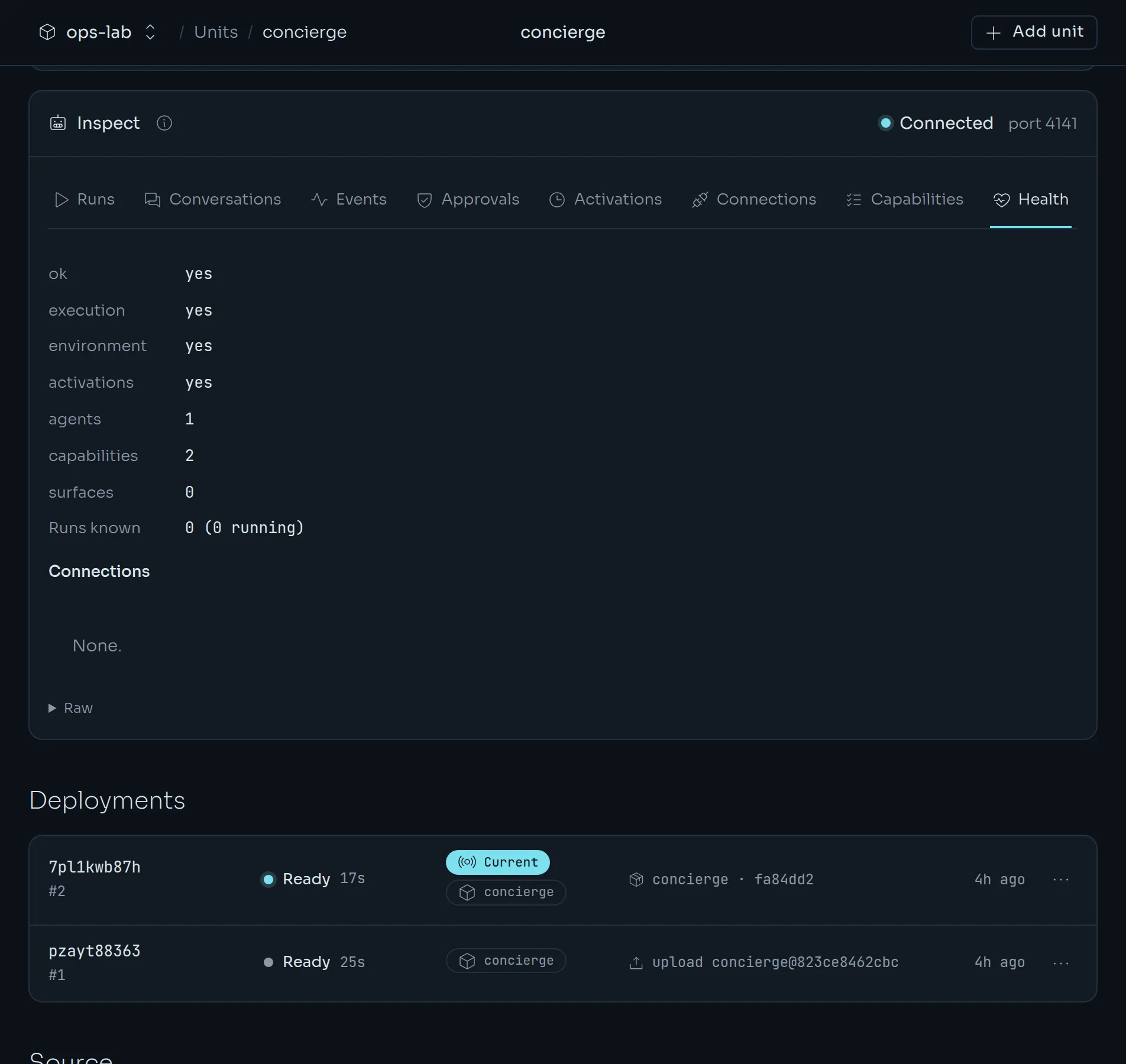
The app must accept Authorization: Bearer $FOUNDRY_TOKEN, which the authorizer above does. If the unit has no FOUNDRY_TOKEN yet, the card offers Generate token and restart. Kuiper stores a random token as the project secret FOUNDRY_TOKEN_<UNIT>, points the unit's FOUNDRY_TOKEN at it and restarts the unit. Nothing else changes, and the same token keeps working for your own API clients.
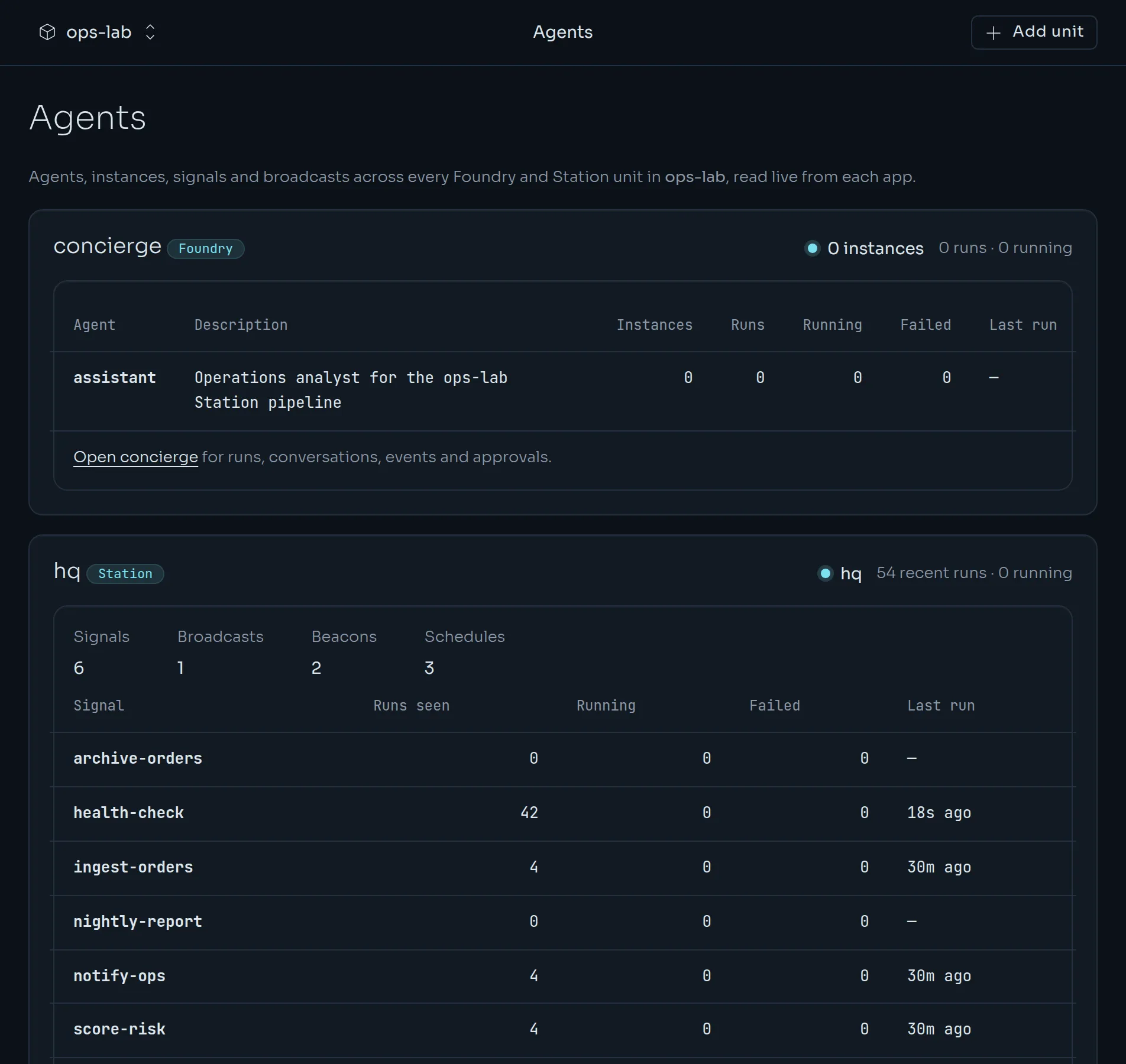
The Usage page adds an Agent activity section: runs, model generations, tool calls, tokens and approvals waiting.
Persist state#
Foundry's default data adapter lives in memory, so a restart loses agent instances, conversations and activations. Keep state on the unit's volume:
import { FileFoundryDataAdapter } from "glove-foundry";

const dir = process.env.AGENT_DATA_DIR ?? "/data";
export const data = new FileFoundryDataAdapter({ file: `${dir}/foundry.json` });
For conversations, use SqliteStore from glove-sqlite with a file under /data. These adapters are single-host, so a Foundry unit runs one replica. Kuiper guarantees that. A unit with a volume is recreated on deploy, never overlapped.
Foundry's embedded Station keeps its run queue in memory, and runs time out after five minutes. Long waits belong in glove_foundry_sleep.
Health#
Foundry's /health runs behind your authorizer and always answers 200, so readiness is only in its ok field. The default manifest uses "health": {"tcp": true}, and the unit is healthy once Foundry accepts connections. If your authorizer lets /health through, you can use "health": {"http": "/health"} instead.
Logs#
kuiper logs -u concierge -f
kuiper logs -u concierge --deployment dep_…
The second form reads an earlier deployment's logs. Foundry prints only its startup banner. Per-run output goes to Foundry's own observability store, which you read in the inspector or at /api/events, behind your authorizer.
Next.js with Foundry#
Apps that run Next.js and Foundry as two processes deploy as two units from the same repository: the Foundry unit with its root set to the app, and the Next.js unit with its own kuiper.json that runs next start. Point the web unit at the Foundry unit's private address:
kuiper env set -u web 'FOUNDRY_URL=${{concierge.INTERNAL_URL}}'