Agents
Glove on Kuiper
How an agent built with Glove and Glove Foundry runs on Kuiper. Which Kuiper service backs each part of the agent, what to set before the first deploy, and the steps for a personal agent, a support desk, a coding agent and a web or voice front.
On this page
Three layers#
Glove is a TypeScript framework for building agents. Kuiper runs what you build with it. An agent you deploy here has three layers:
| Layer | Built with | What it adds |
|---|---|---|
| Harness | Glove | The agent loop, tools, what the model sees, what it remembers, a workspace for files and code, and the way people reach it |
| System | Glove Foundry | Many agents from one definition, conversations, schedules and sleep, inbound channels, approvals, an HTTP API and an inspector |
| Production | Kuiper | Somewhere to run it, somewhere to keep its state, models, browsers, sandboxes and mail to reach, and a way to watch it |
Glove's first principles page explains each part, and its primitives map lists what already exists for each one. This page covers the last layer: what Kuiper gives a Foundry app, and what you set up for it.
What backs what#
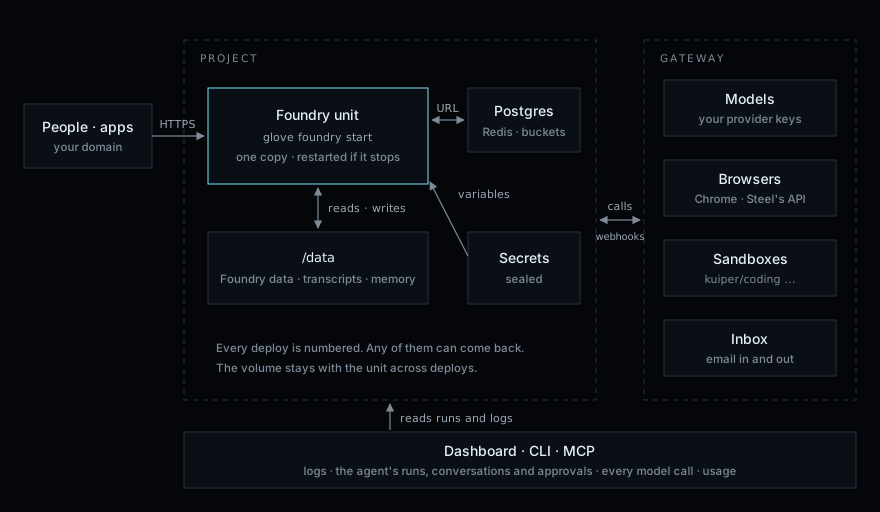
Each part of a Glove agent has a Kuiper service under it:
| In your agent | On Kuiper |
|---|---|
glove foundry start | A unit, built from your folder or repository with no Dockerfile. See Glove Foundry units. |
FileFoundryDataAdapter: instances, conversations, schedules, workspace data | A file on the unit's volume, /data. It stays across restarts and deploys. |
Conversation stores, glove-memory/sqlite, working environment snapshots | Files on /data too, or your own adapter on a managed Postgres. |
| Schedules, sleep and playbook subscriptions | One running copy of the unit. Every Foundry runtime arms the schedules it finds, and a unit with a volume always runs one copy, so each schedule fires once. |
createAdapter from glove-core | The model gateway, with your own provider keys. Every call is recorded with its tokens and cost. |
| Glove tools that drive a browser | Browsers: real Chrome behind Steel's API, with profiles for logins. |
| Glove tools that run code | Sandboxes from ready-made images, or Station's own container sandboxes on the unit. See Browsers and sandboxes from glove-execution. |
| An agent's email | A mailbox, and the Glove tools in @kuiper-sh/inbox/glove. |
requestAuthorization and a bearer token | The unit's Inspect card and the project's Agents page, which read runs, conversations and approvals from Foundry's own API. |
API keys in .env | Secrets, bound into the unit's variables. They never enter the image and are redacted from logs. |
| Foundry's event stream | Logs that survive restarts, network logs, and usage with budgets. |
The built-in models, browsers, sandboxes and inbox resources give each running copy of a unit the gateway's address and a key. Reference the outputs, under names of your choosing:
| Output | What it is |
|---|---|
${{models.BASE_URL}} | The base URL for Glove's providers, except anthropic |
${{models.ANTHROPIC_BASE_URL}} | The base URL for Glove's anthropic provider |
${{browsers.BASE_URL}}, ${{sandboxes.BASE_URL}}, ${{inbox.BASE_URL}} | The other services |
${{models.API_KEY}} | The running copy's gateway key. Any service's API_KEY is the same key |
The key opens only the services the unit's variables reference. A unit that calls models and reads mail references both ${{models.…}} and ${{inbox.…}}. See Variables and secrets.
Before the first deploy#
A Foundry app needs four things to run well here.
Keep state on the volume. Foundry's default data adapter lives in memory, and each run starts a new process, so a plain in-memory conversation store forgets earlier turns. Write both to
/data:import { defineApplication, FileFoundryDataAdapter } from 'glove-foundry'; export default defineApplication({ name: 'concierge', data: new FileFoundryDataAdapter({ file: '/data/foundry.json' }), // conversationStore: a durable store, also under /data // requestAuthorization: see step 2 });Glove's persistence guide covers the four kinds of state to keep: Foundry's data, transcripts, memory and the working environment's files.
- Add an authorizer. Foundry won't listen on a public address without
requestAuthorization. Add an authorizer has one that accepts a bearer token and a dashboard login. Call models through the gateway.
@kuiper-sh/sdkgives Glove'screateAdapterits base URL and key:import { Kuiper } from '@kuiper-sh/sdk'; import { createAdapter } from 'glove-core/models/providers'; import { defineAgent } from 'glove-foundry'; const kuiper = new Kuiper(); // reads KUIPER_GATEWAY_KEY export default defineAgent({ description: 'Answers for Acme', model: () => createAdapter({ provider: 'anthropic', model: 'claude-sonnet-5-5', ...kuiper.models.glove('anthropic') }), systemPrompt: 'You answer questions for Acme. Use your tools for facts.', });kuiper providers add anthropic --key - kuiper env set -u concierge 'KUIPER_GATEWAY_KEY=${{models.API_KEY}}'Without the SDK, pass
baseURLandapiKeyyourself: see Models.Deploy.
kuiper units create concierge
kuiper deploy --source . -u concierge --wait
To deploy on every push instead,
kuiper linkthe repository. See Deploying.
Then turn on the Foundry inspector login, and generate the token the Inspect card reads with.
Deploy a harness#
The same unit takes different shapes of agent. These are the steps for four common ones.
A personal agent#
An assistant you message, that remembers you, sets reminders, browses and writes back.
- Give it a mailbox. Run
kuiper inbox create assistantand returninboxTools(inbox, { mailbox: 'assistant' })from the agent'stools. Example: an email agent has the code. - Let it check in on its own. Foundry's built-in
glove_foundry_scheduleandglove_foundry_sleeptools create reminders and wake-ups. They are kept in/dataand survive deploys. - Give it a browser. Use Browsers from a tool, with a profile so logins carry over between sessions.
- Keep its memory on the volume. Point
glove-memory's SQLite adapters at a file under/data. - Reach it from a chat app. A chat platform that you poll, such as a bot's long-polling API, needs no public route. One that calls a webhook goes through a small forwarding unit, as in the support desk below.
A support desk#
Agents per customer that wake when a ticket or message arrives.
- Model the channel in Foundry. A transmission and a playbook decide which agent takes each event. See Apps and transmissions in Glove's docs.
- Receive the provider's webhook in a second unit. Foundry's API sits behind your authorizer, so a ticket system can't call it directly. Deploy a small web unit that checks the provider's signature and forwards the event with
dispatchInboundfromglove-foundry/client. Reach Foundry privately. Point the web unit at the Foundry unit's private address, which needs no public route:
kuiper env set -u hooks 'FOUNDRY_URL=${{concierge.INTERNAL_URL}}'- Keep customer data in Postgres if you outgrow files:
kuiper db create postgres main, then reference${{main.DATABASE_URL}}.
A tool that needs approval pauses the run until someone approves or denies it, in the inspector or through Foundry's API, or until the request expires.
A coding agent#
An agent that writes code and runs it somewhere other than your unit's own process. Two ways work today:
- Kuiper's sandboxes, from your own tools.
kuiper.sandboxes.create({ image: 'kuiper/coding' })gives a remote computer with a terminal, files and ports. It runs on separate machines, is billed by the second and can hibernate. See Sandboxes. - Station's container sandboxes, on the unit. Foundry's managed Station can host
ContainerSandboxAdapterfromstation-sandbox, which agents reach withmountSandboxfromglove-execution. When your app depends onstation-sandbox, the builder adds the Docker CLI and asks for a Docker socket that Kuiper serves. Start images by name, such askuiper/coding; see Sandbox images.
A web or voice front#
A Next.js app, or a voice host, in front of durable Foundry agents.
- Deploy two units from one repository: the Foundry unit, with its root set to the Foundry app, and the web or voice unit with its own
kuiper.json. - Connect them privately with
${{concierge.INTERNAL_URL}}, as in Next.js with Foundry. - Keep the voice provider's key a secret of the voice unit. The voice host hands durable work to Foundry over the private address.
Browsers and sandboxes from glove-execution#
glove-execution gives a Glove agent execute_browser and execute_sandbox. Its adapters today drive browsers and sandboxes that a Station hosts. It has no adapter for Kuiper's gateway yet.
- Station on the unit. Foundry's
stationDaemonhosts Station's container sandboxes and browsers, and the agent mounts them. On Kuiper, depending onstation-sandboxorstation-browser-usegives the unit a Docker socket that Kuiper serves and polices. Every container runs under gVisor within the unit's limits. Images other than Kuiper's ready-made ones must be on your operator's allowlist. - Kuiper's services in your own tools. Call Browsers and Sandboxes through
@kuiper-sh/sdkfrom Glove tools you write. They run apart from your units and are held to your budgets.
Next#
${{…}} references work.On Glove's site, Put it in production walks one agent from a laptop to Kuiper, and Deploy on Kuiper is the Foundry side of this page.